Node-RED 5 Is Here: What It Means for Industrial Teams
The biggest change to the editor since the project began, and it's already live on FlowFuse Cloud.
Node-RED 5 is out, the biggest change to the editor since the project began, and it's primarily an editor release: redesigned sidebars, a new Explorer panel, a built-in dark theme, and functional and security improvements across debugging, authentication, and TLS. The Node-RED 5 stack is already live on FlowFuse Cloud. To upgrade a Hosted Instance, open its settings, change the stack to Node-RED 5, and click Change Node-RED Version, the instance restarts on 5.0. Check edge hardware first: Node-RED 5 needs Node.js 22.9 or later and drops 32-bit ARM, so Raspberry Pi 3B and earlier won't run it.
Node-RED 5.0 is out, the biggest change to the editor since the project began. Nick O'Leary, our CTO and Node-RED's co-creator, announced it today on the Node-RED forum.
What's new
Node-RED 5 is the first release built around the editor itself. Previous major versions focused on the runtime and what Node-RED could connect to. This one reworks the place people spend their whole day.
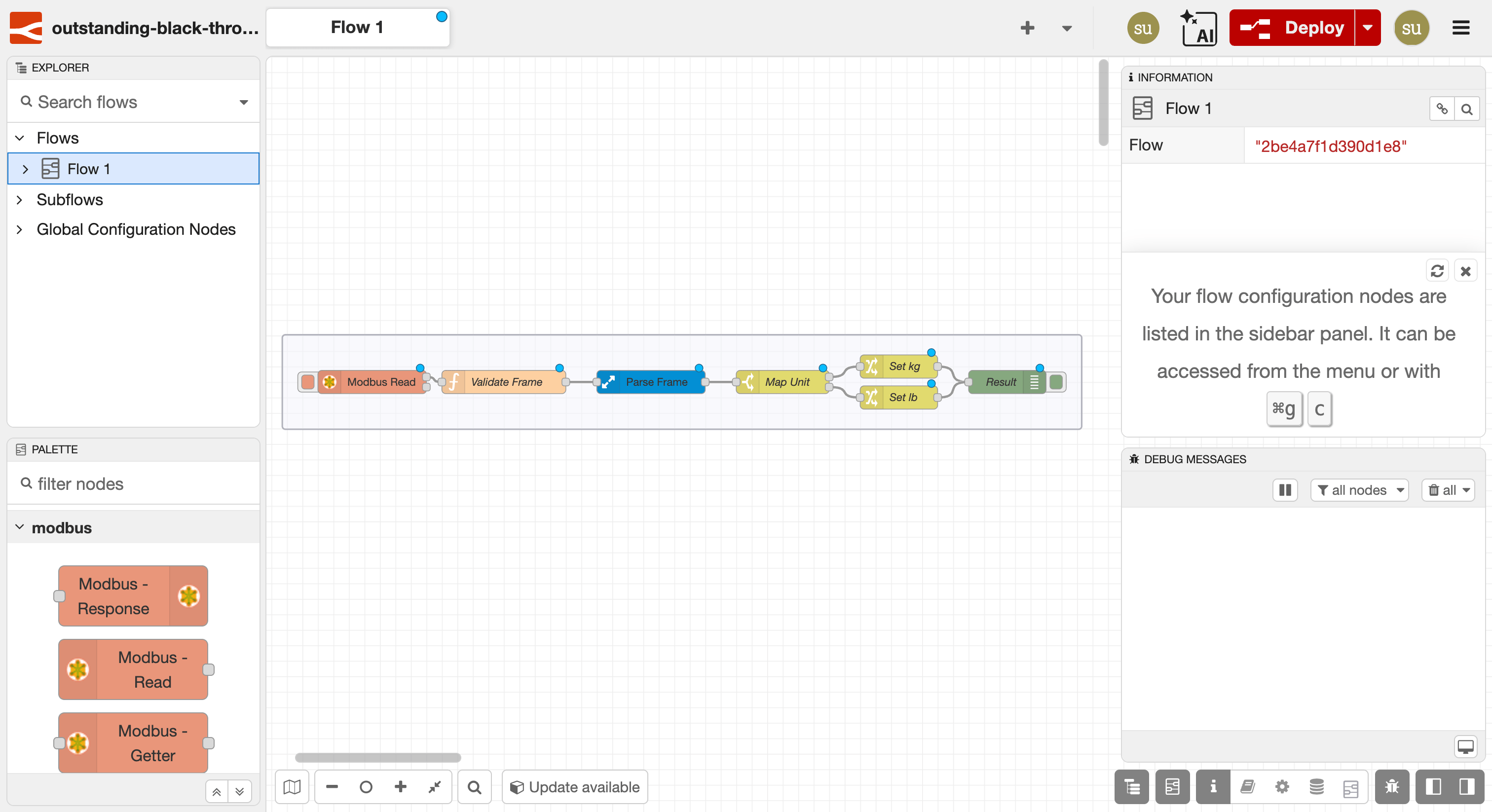
The redesigned sidebars now behave the same on both sides of the editor. Controls are grouped together instead of buried in a menu, and you can split one vertically to keep two panels open at once. A new Explorer panel gives you a structured view of your flows, making large projects with dozens of tabs far easier to navigate. And a built-in dark theme now ships in core, with no custom packages needed, alongside an accessibility review of the default theme.
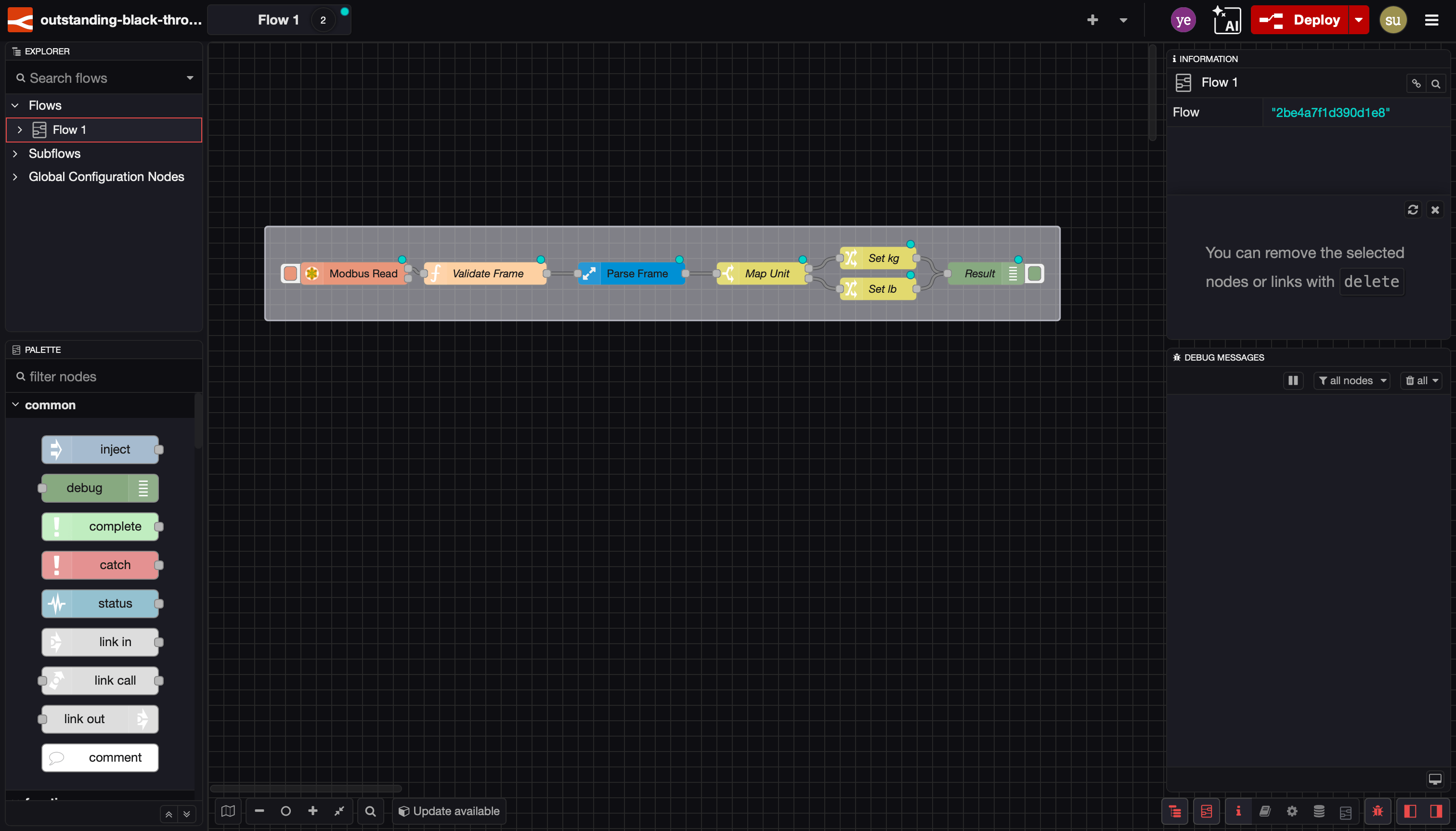
Underneath the visual changes are functional and security improvements across debugging, authentication, and TLS, the parts that matter most once Node-RED is running in production. If previous releases expanded what it could do, this one sharpens how it feels to use. For the full list, read the release blog.
What it means for industrial teams
The editor is where your team spends its day, so changes here add up fast across a working week.
Most of what's new pulls in the same direction: less time fighting the tool, more time on the flow. The Explorer panel gives you a structured view of the whole project, so a flow set that spans dozens of tabs across several developers stops being a scavenger hunt. Picking up an unfamiliar flow, or onboarding someone new to it, takes seconds. The redesigned sidebars cut friction the other way: controls sit in the same place on both sides, and splitting one vertically keeps your debug output and node config open at once, so there are fewer clicks between the thing you're building and the thing telling you whether it works.
For teams running long sessions on a plant floor or in a control room, the built-in dark theme, now in core with no custom package to install and maintain, and the accessibility review of the default theme mean a readable, lower-strain interface out of the box.
FlowFuse Management and AI-Powered Flow Building, Now with Node-RED 5
Node-RED is an editor and runtime. Operating it across teams, sites, and production environments is a different challenge entirely.
FlowFuse provides the platform capabilities industrial teams need to run Node-RED at scale: team collaboration, role-based access control, version control and deployment pipelines, SSO, audit logs, TLS-enabled instances, self-hosted and air-gapped deployments, and SOC 2 compliance.
The Node-RED 5 stack is available on FlowFuse Cloud today, allowing teams to take advantage of the redesigned editor, Explorer panel, built-in dark theme, and the latest platform improvements as soon as they upgrade their instances.
Alongside Node-RED 5, FlowFuse continues to improve how teams build applications. With the FlowFuse 2.31 release, FlowFuse Expert introduced agentic application building in open beta. Describe your application requirements in plain language, and FlowFuse Expert generates a working starting flow directly in your workspace for both Hosted and Remote Instances.
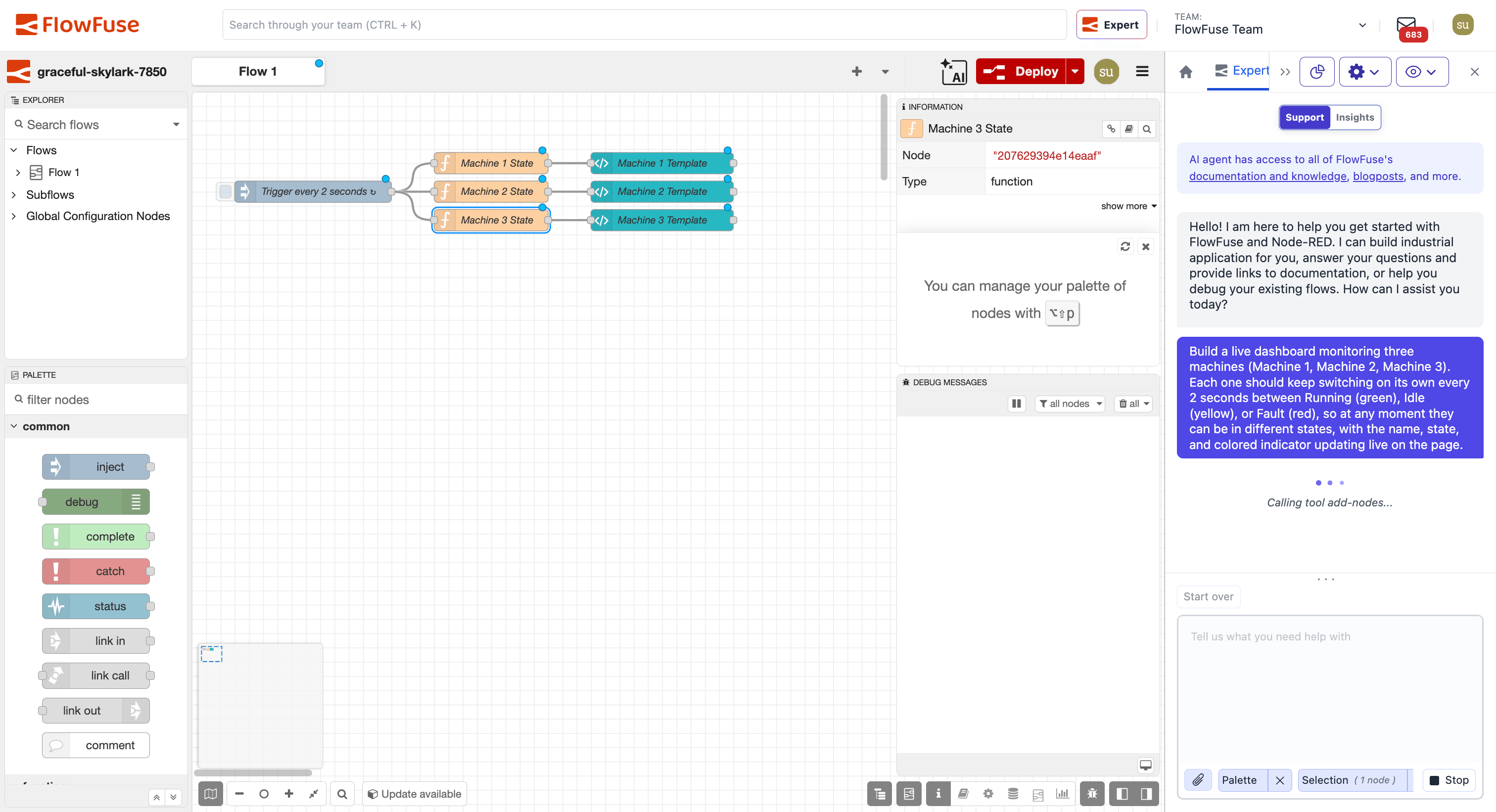
Teams can take advantage of Node-RED 5's redesigned editor while using FlowFuse to manage, secure, deploy, and scale their applications across production environments.
Upgrading your instances
Before you start, check one thing for edge hardware: Node-RED 5 needs Node.js 22.9 or later and drops 32-bit ARM, so hardware that can't run a 64-bit OS, such as the Raspberry Pi 3B and earlier, won't run it.
Note: Changing an instance's Node-RED version requires a restart. Your flows won't run while this happens.
To upgrade a FlowFuse Hosted Instance:
- Open the instance settings.
- Click the Change Node-RED Version button, then select the Node-RED 5 stack from the dropdown.
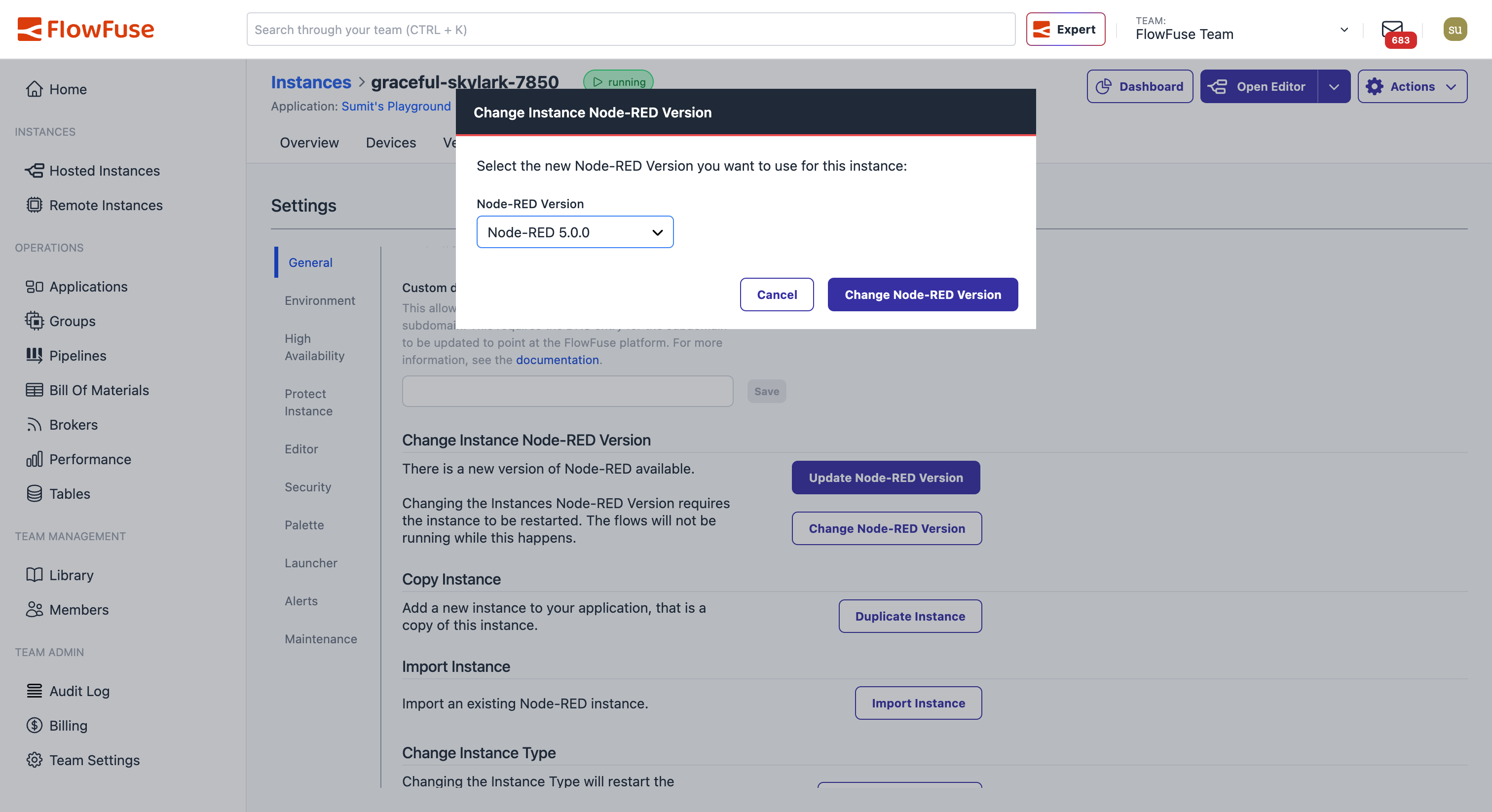
- Click Change Node-RED Version.
That's it. Once the instance restarts, you'll be running Node-RED 5 and can start using the redesigned editor, Explorer panel, built-in dark theme, and the latest platform improvements immediately.
To avoid having to manually update your instances in the future, enable automatic stack updates. For production deployments, FlowFuse's Scheduled Maintenance feature lets you control when updates and restarts are applied, ensuring changes are rolled out during planned maintenance windows.
Get Node-RED 5 in production today
The Node-RED 5 stack is live on FlowFuse Cloud. Get the new editor plus the access controls, version control, SSO, secure deployments, and SOC 2 compliance an enterprise needs to run it at scale.
Frequently Asked Questions
About the Author
Sumit Shinde
Technical Writer
Sumit is a Technical Writer at FlowFuse who helps engineers adopt Node-RED for industrial automation projects. He has authored over 100 articles covering industrial protocols (OPC UA, MQTT, Modbus), Unified Namespace architectures, and practical manufacturing solutions. Through his writing, he makes complex industrial concepts accessible, helping teams connect legacy equipment, build real-time dashboards, and implement Industry 4.0 strategies.
Related Articles:
- FlowFuse + LLM + MCP = Text Driven Operations
- The Industrial IoT Market Shift: What the PTC Divestment Means for Your Data Strategy
- MCP and Custom AI Models on FlowFuse!
- EtherNet/IP Integration with FlowFuse: Communicating with Allen-Bradley PLCs
- The Node-RED Revolution: How Low-Code is Democratizing Industrial Automation